Objects
Most languages give us basic types to store numbers, text, and Booleans, and arrays to store lists of values. Object Oriented languages provide tools for creating user-defined types that combine storage for multiple types together, alongside methods, to represent more complex components of a program.
The Procedural Paradigm in programming design thinks of a program as a series of steps. This series can be very complex, involving many loops, conditionals, and methods, but ultimately it can only design a program in terms of events happening in a particular order. If you think about a menu-based program, where the user is offered a list of options over and over, which may lead to actions and/or other lists of options, and so on, procedural programming describes this very well. We have been doing procedural programming all along, and many people feel it is the easiest approach to learn for the first time.
However, if you think about a modern word processor, operating system, or open-world game, describing these in terms of a series of steps is much more difficult. The user could choose to use any part of the program at any time in any order, and most of the parts interact with one another. It would be easier to think of these programs as groups of interacting components.
The Object Oriented Paradigm in programming design thinks of a program as a group of types of components, each of which has characteristics and behaviors. The types of components will be represented in the program by types of object, usually called classes. The characteristics of the components will be represented by variables stored in the classes, and the behaviors by methods stored in the classes.
Remember that we want our design approach to make our lives easier. By having the code divided into classes in a way that follows our conceptual understanding of the situation our program reflects, we remove a lot of mental burden – the code reflects our thinking. Object orientation supports laziness in other ways too. Classes make our code modular – it is possible to pull a class out of one program and put it into another program that needs a similar type of component, and it is easier for different teams of programmers to be working on components of the same program without worrying about changes to details in one breaking the code in another.
This can come at a cost, however. It usually takes a little more storage space to store the objects, and a few more steps to set them up. So for smaller, simpler programs an object oriented version might be larger and slower to run than a procedural version. If you are just writing a short, linear program to automate a task, you probably want to work procedurally for efficiency; but for something large and complex, that small extra cost of space and time is usually minor compared to other space and speed issues and it is worth that cost to make the program easier to design, write, and maintain.
Classes
A class represents a type of component involved in a program. When designing a program using object orientation, the first step is to identify what the classes should be. Once classes are created, each class will be a valid type for variables in the program, just as good as built-in types like int or double. Each class should be named with a meaningful name, and in our pseudocode we will give them names that start with a capital letter. We use the keyword class to begin a class, and each class is a structure surrounded by {} as usual.
So, if our program will involve dogs and cats, we might create a class Dog and a class Cat, and once created, those become valid types for variables in that program. The values of these variables, based on the class, are called objects also known as instances of the class.
class Dog{
// we will put more here soon
}
class Cat{
// here too
}
void main(){
int x // x is a variable of type int
Dog fluffy // fluffy is a variable of type Dog
Cat muffy // muffy is a variable of type Cat
Dog d2 // d2 is another variable of type Dog
Cat c2 // c2 is another variable of type Cat
}
In the code above, we could say that “fluffy is a Dog object”, or that “fluffy is an instance of the class Dog” but when being casual, we would often just say that “fluffy is a Dog” just as we would say that “x is an int”.
Instance Variables
For each class type in our program, there may be various characteristics we need to keep track of. Some of these may be permanent characteristics, such as the name or breed of a dog, others may be used for tracking a current state that can change over the run of the program, such as whether the dog is hungry or asleep. As usual, we will store these values in variables, but now these variables will be collected inside the class.
These are known as instance variables, fields, or attributes of the class. To add an instance variable to a class we simply declare it inside the class structure.
class Dog{
string name // instance variable for the Dog’s name
int age // the dog’s age
boolean awake // is the dog currently awake?
}
When we have a variable of a class type, we can access the instance variables in that object using the dot operator syntax. A period goes between the name of the class-type variable and the name of one of that class’ instance variables. We usually pronounce this dot operator as a possessive s so fluffy.age is pronounced “fluffy’s age”.
Just like values that live inside an array, values that live inside an object are still values of their type and can be used anywhere else we would use such values. We can print them; we can use them to do math if they are numbers; we can use them to make decisions if they are booleans.
Each instance of the class has its own copy of the full structure of the class, including all the instance variables.
class Dog{
string name // instance variable for the Dog’s name
int age // the dog’s age
boolean awake // is the dog currently awake?
}
void main(){
int x
Dog fluffy
Dog d2
// use the dot operator to access fluffy’s name
fluffy.name = “Fluffywuffykins”
name = “Wrong” // error, we didn’t create a variable name
// we can only access the name in the dog class
// by using the dot operator for a specific dog
int age = 5 // legal, but this age is unrelated to
// the dogs’ ages
// d2’s name is a separate variable with its own value
// it is a string, we can read it in from the user
d2.name = prompt(“What is the second dog’s name?”)
// fluffy’s age
fluffy.age = 2
// fluffy.age is an int, we can do math with it:
x = fluffy.age * 3 // x is now 6
d2.age = fluffy.age + x // d2’s age is now 8
// d2 is awake
d2.awake = true
// d2’s awake variable is a boolean, we can use it
// to make decisions
if (d2.awake) {
print(d2.name + “ is awake”)
}
}
As usual, we need to know for a given language what values the instance variables have if we have not initialized them explicitly. They might have default values, garbage values, or be unable to be used until they are initialized. We will assume in our pseudocode that they have the default values 0 for numbers, false for Booleans, null for strings.
But now there are other possibilities for types! Since a class defines a type that is valid for variables, we can put an instance variable of one class type inside another class.
class Cat{
string name // the cat’s name
double weight // the cat’s weight
double fleaWeights[10] // the weight of each flea on the cat
}
class Dog{
String name // instance variable for the Dog’s name
int age // the dog’s age
boolean awake // is the dog currently awake?
Cat buddy // the dog’s buddy, which is a Cat
}
void main(){
Dog fluffy
fluffy.name = “Fluffers”
fluffy.age = 2
Dog d2
d2.name = “Spot”
d2.age = 1
d2.awake = true;
//fluffy’s buddy (a cat) is named “Mr. Whiskers” and
// weighs 4.2 lbs
fluffy.buddy.name = “Mr. Whiskers”
fluffy.buddy.weight = 4.2
// the weight of the 0th flea on fluffy’s buddy is .0002
fluffy.buddy.fleaWeights[0] = .0002
// a separate cat unrelated to the dogs
Cat ginger
ginger.name = “Ginger McBeans III”
}
Notice that the instance variables of a class are local to that class. The name instance variable inside Cat does not interfere with or create a special relationship with the name instance variable inside Dog, and neither can be directly accessed outside the class without using the dot operator to explicitly say which Cat or Dog it is related to
We will assume that default values apply to instance variables of instance variables (and so on), so since we never set values for d2’s buddy’s instance variables, its name is still null and its weight is 0 and all its fleas start as weight 0.
Class Methods
An object is not just a user-defined data type that combines other data types, it also allows us to group together behaviors specific to the type of component by putting methods inside the class. We think of these methods as behaviors that are being done by an instance of the class.
Each method in the class has access to all the class’ instance variables in addition to any parameters and other local variables of the method itself.
We can access an object’s behavior methods using the dot operator.
class Dog{
string name // instance variable for the Dog’s name
int age // the dog’s age
boolean awake // is the dog currently awake?
void bark(){
print(name + “ says woof”)
}
void sleep() {
print(name + “ goes to sleep”)
awake = false;
}
int convertAge() {
int peopleYears = age * 7
return peopleYears
}
}
void main(){
Dog fluffy
fluffy.name = “Fluffers”
fluffy.age = 2
Dog d2
d2.name = “Spot”
d2.age = 1
d2.awake = true;
// fluffy does fluffy’s bark behavior
fluffy.bark() //print “Fluffers says woof”
// d2 does d2’s bark behavior
d2.bark() //print “Spot says woof”
d2.sleep() // print “Spot goes to sleep”
// d2.awake becomes false
print(“in people years, “ + d2.name + “ is “ +
d2.convertAge() + “ years old”)
}
Like any other method, the methods defined in a class are only called if they are called by the program starting from main.
Just as we have to be able to write a method in general to use its parameters without deciding beforehand a single specific value for the parameters, we have to be able to write a method in a class to use its instance variables without knowing a single specific value for each instance variable. We should generally assume that there will be multiple instances of the class created, and each instance of the class should be able to do its behaviors and maybe get different results depending on the current values of the instance variables.
Since an array can hold any type that is valid for a variable, we can also have arrays of object types. In most cases if we have multiple kinds of information about a list of things, it is much better to create a class to hold the kinds of information in instance variables, and then have an array of that type, instead of using parallel arrays
void main(){
// instead of three parallel arrays for
// dog name, age, and awake status
Dog kennel[10] // create array of 10 dogs
kennel[0].name = “Spot”
kennel[0].age = 7
kennel[0].awake = true
kennel[1].name = “Rover”
kennel[1].age = 3
kennel[1].awake = false
// etc, fill in rest of dog info
// have each dog bark and then go to sleep
for (int i = 0; i < kennel.size; i = i + 1){
kennel[i].bark()
kennel[i].sleep()
}
}
Pointers
We were able to give the Dog class a Cat type variable, buddy, so that our dog could be friends with a cat. But what if we want to represent a dog being friends with another dog?
class Dog{
String name // instance variable for the Dog’s name
int age // the dog’s age
boolean awake // is the dog currently awake?
Cat buddy // the dog’s buddy, which is a Cat
Dog bestFriend // the dog’s
best friend is another Dog?
}
void main() {
Dog fluffy
// no point in putting code here, the line above
// NEVER ENDS
}
If we do this, then to create the structure of the Dog object, the computer would have to create another Dog object inside it, which has another Dog object inside it, which has another Dog object inside it, which has another Dog object inside it, which has another Dog object inside it… This is infinite recursion hell. We can never stop making Dogs![1]
Dogs need dog friends! We need to solve this problem!
The solution is known as pointers or reference variables. Instead of having Dog structures nested inside each other, we will give a Dog object a different way to access another Dog object: we will give it the ability to store the address in main memory where the other Dog is located. A variable that stores the memory address where data is stored is called a pointer or reference.
Remember that the main memory (RAM) of the computer is just a big table of numbered rows, and on each row we can store some data. The row numbers are called memory addresses. Since the rows are numbered, one kind of data we can store on a row is the memory address of another row in memory.
Remember that a variable is actually just a name for a particular row of memory anyway. Data is always stored at a memory address, variables just give us the convenience of using a memorable name instead of remembering a number. So a pointer variable is also a name for a row of memory, but instead of storing the value directly there, we are using that row to store the number of another row. (The programmer never needs to know what the row numbers actually are to be able to use this idea, but I will make up row numbers for some examples.)
In our pseudocode, we will use an asterisk to denote that a variable is a pointer to a type instead of directly holding the value of that type. We will also use an asterisk when we want a pointer to be able to point at an existing variable’s address. So
|
// assume we are inside main // and the Dog class is already // created with just name and age Dog actualDog // just an actual dog Dog d2 // another actual dog Dog * leash // a pointer to a dog // point leash at actualDog’s // address in memory (MM100) leash = *actualDog // these two lines mean // exactly the same thing // both affect the name of the dog // at address MM100 leash.name = “Actie” actualDog.name = “Actie” // now leash points at d2 leash = *d2
// these two lines do the same thing leash.name = “Spot” d2.name = “Spot” |
|
A pointer variable holds the memory address of a value, so it can hold the memory address of another non-pointer variable of its type. You can think of a pointer as being like a nickname that can be used alternately with another variable name, or like a remote control that can be paired with an existing piece of electronics, or like a leash that can control an animal. But the leash isn’t the animal itself, just a way of controlling it.
Note that leash in the above code was first pointed at actualDog, and so it could be used to set that Dog’s name, but later, it was pointed at d2, and could be used to set that Dog’s name. Imagine hooking a leash first onto one dog’s collar, and later onto another dog’s collar.
To picture what is happening in memory when this code runs:
· When we create actualDog, a chunk of main memory is taken to store all the data for a dog. Let’s say this chunk starts at address MM100. The actualDog variable doesn’t hold the value MM100, it is MM100, what it holds is space for all the instance variables and any methods defined in the Dog class
· Similarly, let’s say that d2’s data is stored starting at MM200.
· leash is also a variable, so its value is also stored on a row in memory, let’s say MM300, but it isn’t storing a Dog, it just stores a memory address where we will find an actual dog.
· When we say leash = *actualDog, we are saying that leash now is pointing at actualDog, which is MM100. So on leash’s row in memory, we will store MM100. This means that when we say leash.name, that takes us to MM100.name.
· When we later say leash = *d2, leash now points at MM200, so in the later line leash.name takes us to MM200.name.
In our pseudocode we are using the dot operator to access the instance variables of both object variables and pointer variables. Some languages use different syntax for the two cases, for instance in C++ it would be actualDog.name for the object and leash->name for the pointer.
When we assign one variable to another, we are copying its value. For object variables, this means copying the whole object, including the values of all instance variables. But the value of the pointer variable is just the memory address. This means that when we assign one Dog object variable to another, we end up with two complete Dogs. But when we assign one Dog pointer to another, we just have two memory addresses, and we are not making another Dog.
|
Dog firstDog Dog secondDog Dog otherDog Dog * pointerA = * otherDog Dog * pointerB firstDog.name = “Fluffy” firstDog.age = 4 // copy firstDog’s value // which means all parts of the // dog object secondDog = firstDog // change the name in the copy secondDog.name = “Muffy” // pointerA is pointing at otherDog pointerA.name = “Buffy” pointerA.age = 3 // copy pointerA’s value // which is just the memory address // of the otherDog variable pointerB = pointerA // both pointers point at the same // dog, so any changes made by // either one affect that pointerB.name = “Clyde” |
|
Now we can finally fix our Dog class to give a Dog a bestFriend who is another Dog
|
// Dog class with pointers class Dog{ String name int age Dog * bestFriend } void main(){ Dog fluffy fluffy.name = “Fluffy” fluffy.age = 3
Dog spot spot.name = “Spotty” spot.age = 2 // using pointers, they become // each other’s best friend fluffy.bestFriend = * spot spot.bestFriend = * fluffy print(spot.name + ” is best friends with “ + spot.bestfriend.name + “ whose best friend is “ + spot.bestfriend.bestfriend.name”) } |
|
The last line would print “Spotty is best friends with Fluffy whose best friend is Spotty”. Since the bestFriend variable is a Dog pointer, and every Dog has a bestFriend variable, and we have made these two Dogs each other’s bestFriend, we could go around this circle indefinitely. Make sure you understand why this would be a perfectly valid thing to write at the end of the above code: fluffy.bestFriend.bestFriend.bestFriend.bestFriend.bestFriend.bestFriend.bestFriend.bestFriend.bestFriend.bestFriend.bestFriend.bestFriend.bestFriend.bestFriend.bestFriend.bestFriend.bestFriend.bestFriend.bestFriend.bestFriend.bestFriend.bestFriend.bestFriend.bestFriend.bestFriend.bestFriend.bestFriend.bestFriend.bestFriend.bestFriend.bestFriend.bestFriend.bestFriend.bestFriend.bestFriend.bestFriend.bestFriend.bestFriend.bestFriend.bestFriend.bestFriend.bestFriend.bestFriend.bestFriend.bestFriend.bestFriend.bestFriend.bestFriend.age = 8
Creating objects with Pointers
In the previous examples, we created Dogs, and then used a pointer to point at one of them, then the other. But we don’t have to create the object in a regular variable first before putting the address in a pointer. The new syntax is used to create an object and store its address in a pointer.
|
// pointers that can store addresses // of Dog objects Dog * pointerA Dog * pointerB // create new Dog objects // and store their addresses // in the pointers pointerA = new Dog // MM200 pointerB = new Dog // MM300 pointerA.name = “Mr. Dog” pointerA.age = 5 pointerB.name = “Spot” pointerB.age = 2 // create another new Dog object // and change the pointer to that // address pointerA = new Dog // MM400 // these changes apply to the // new Dog at MM400 not the // old one at MM200 pointerA.name = “Caesar” pointerA.age = 1 // switch pointerB to also be // the dog at MM400 instead of the // one at MM300 pointerB = pointerA // this change applies to the new // Dog at MM400 pointerB.age = 7 |
|
In this example we used new to create three dogs and each pointer started off pointing at one, but later ended up pointing at another.
Also notice that by the end of the code, there were no pointers storing the memory addresses of two of the Dogs we created, and this means that if our program continued, it would have no way to access those Dog objects! See the section on Memory Management for more on situations like this.
Let’s give the Dog a cat buddy again, but make it a pointer this time so two Dogs can have the same Cat buddy:
|
// simpler Cat class class Cat{ string name double weight } // Dog class with pointers class Dog{ string name int age Cat * buddy Dog * bestFriend } void main(){ Dog fluffy fluffy.name = “Fluffy” fluffy.age = 3
Dog spot spot.name = “Spotty” spot.age = 2 // using pointers, they become // each other’s best friend fluffy.bestFriend = * spot spot.bestFriend = * fluffy // give fluffy a Cat buddy fluffy.buddy = new Cat fluffy.buddy.name = “Ginger” // spot’s buddy is the same Cat spot.buddy = fluffy.buddy spot.buddy.weight = 7.2 } |
|
Note that in this code, there are two ways to refer to the cat named “Ginger”, either as spot.buddy or as fluffy.buddy, but we did not create a variable of its own to refer to it. This is a good way to communicate that in this code we only care about this cat in terms of its relationship to the dogs. If we later decide that the cat is important in itself, we could always add a line like
Cat * ginger = fluffy.buddy
Again, an array can hold any type that is valid for a variable, so we can have an array of pointers to a class type. We will assume that they all start as the value null, so we have to use new to set each one up before using it.
void main(){
Cat * kittyList[10] // an array of 10 pointers to Cats
for (int i = 0; i < kittyList.size; i = i + 1){
kittyList[i] = new Cat
// generating some starter names and weights
kittyList[i].name = “Cat #” + (i+1)
kittyList[i].weight = (i+1)*2.2
}
}
Null Pointers
The value null represents an invalid memory address. We will assume that pointers to objects in arrays and as instance variables default to the value null. Trying to use the dot operator on a pointer to act on variables or methods inside an object when the pointer is holding the value null is a runtime error.
This null pointer error is the best thing that could happen if we have not initialized the value of a pointer. Remember that some languages let variables use the “garbage value” that happened to be sitting on their row in memory (from some previous program perhaps) when they were declared. For other types of variable, this might lead us to calculate or print a wrong or nonsensical value, which could certainly lead to trouble. But suppose the variable is a pointer and that garbage value is a valid value for a memory address. If we try to write data to something at that value, we could end up overwriting any other data or instruction anywhere in Main Memory![2]
A null pointer error is one of the most common types of error when programmers are learning to write code with pointers, because it is easy at first to forget which pointers have not been initialized yet
|
// simpler Cat class class Cat{ String name double weight } // Dog class with pointers class Dog{ String name int age Cat * buddy Dog * bestFriend } void main(){ Dog fluffy fluffy.name = “Fluffy”
Dog spot spot.name = “Spotty” // error! bestFriend is null fluffy.bestFriend.age = 4
// error! buddy is null
fluffy.buddy.name = “Ginger” // make this not null spot.bestFriend = * fluffy spot.bestFriend.age = 3 // but this is still null spot.bestFriend.bestFriend.age = 1
} |
|
Note that since we set spot’s bestFriend variable to point to fluffy, it stopped being null, but that did not automatically make fluffy’s bestFriend variable point to spot (not all friendships are requited, sad to say).
Memory Management
In a previous example, we pointed a pointer variable at a Dog that we did not have a plain object variable for, and then changed that pointer to point at a different Dog, which meant we lost access to that Dog object. The object still existed in main memory, but our program no longer had access to it.
Although in examples I have drawn main memory very simply, most languages actually divide program memory space into areas called the stack and the heap. When we create an object variable (not a pointer) space for that object would actually be in the part of main memory for the method it was created it, in the stackframe for that method on the stack. This means that when this method ends, the space for that object is automatically marked as able to be re-used for other methods if the program is still running. But when we use the new operator to create an object, space for that object is located on the heap, and is not automatically given back at the end of the method.
This allows us to create objects in a method that persist after that method ends, without having to return them. But this is only useful if we can still access those objects through pointer variables.
In some languages, it is the responsibility of the programmer to manage how their program uses main memory space. If we use the new operator to create an object on the heap and then lose access to it, in these languages we can now no longer reuse this memory space to store something else – it is still marked as being in use – but we cannot actually use the data there. This is called a memory leak.
In these languages, the programmer must use another operator called delete to explicitly give back the space for an object on the heap so that space can be re-used. It is important to not delete too early – that would mean destroying data while we still need it. But it is also important not to delete too late – once we no longer have a pointer to that object, we no longer have a way to refer to it in the program so now we can’t delete it, and a memory leak has occurred.
In other languages, this is not the programmer’s responsibility; instead, the program’s memory space automatically undergoes a process called garbage collection where objects on the heap are tested to see whether they are still reachable by following pointers starting from variables still on the stack. If we can no longer access an object on the heap in any way from the stack, that means the code can no longer use that object, and it is automatically marked as space to be re-used.
Garbage collection is much more convenient for programmers, and means that usually at most we can run low on space for a little while until the next time garbage collection runs during the run of our program. On the other hand, garbage collection takes up time and resources; it can be far more efficient to manage our own memory and make sure that we give memory space back exactly when we need to, especially if we have limited space to work with, ether because we have a small RAM or a very large amount of data to deal with.
Pass By Reference
Remember that generally we have assumed that methods will handle their parameters following the pass by value rule – changes made to a parameter will not affect any variable passed in for that parameter. However, we did assume that arrays worked on a pass by reference model – when we passed in the array, we were passing the memory address of the start of the array itself, so when changes were made to values in the array, these changes were still there after the method ended.
We can get the same behavior for other types by using pointers as our parameter types.
|
// Dog class class Dog{ String name int age Dog * bestFriend } void main(){ Dog fluffy fluffy.name = “Fluffy” fluffy.age = 3 // pass a pointer // changes will affect fluffy playdate(*fluffy) // Mr Friendly is sticking around print(“still friends with “ + fluffy.bestFriend.name) // pass a copy // no changes to fluffy // but…. dream(fluffy) print(fluffy.bestFriend.name + “ was so freaked out by “ + “that dream he seemed to “ + “ age a year and is now “ + fluffy.bestFriend.age) } // pass by reference method // visitor is a pointer void playDate(Dog * visitor){ // it was a long playdate visitor.age = visitor.age + 1 // create a new Dog // on the heap Dog * playMate = new Dog playMate.name = “Mr. Friendly” // put the address of the new dog // into visitor’s bestfriend // variable – permanent change visitor.bestFriend = playmate print(visitor.name + “ made friends with “ + playmate.name) } // pass by value method // dreamer is a copy of the dog void dream(Dog dreamer){ // changing the local copy // this does not affect fluffy // back in main dreamer.age = 1000 print(dreamer.name + “ dreamed of being the “ + “oldest dog in the world.”) //this dream is so weird // it ages your best friend // changing a value on the heap // this is still there later if (dreamer.bestfriend!=null) { dreamer.bestfriend.age = 1 } } |
|
The playdate method takes a pointer to a Dog, so changes to the visitor pointer’s values affect the original Dog fluffy. The change to visitor’s age is a change to fluffy’s age. When we give visitor a new bestFriend, that Dog is still reachable (on the heap) when we get back to main.
The dream method, however, is pass by value. So the dreamer variable just gets a copy of the Dog’s values, and the changes made to that copy don’t affect the original. However, since the copy included a pointer, and that pointer does point to the actual Dog in main memory at MM250, we can make a change that persists to that Dog object.
So, we can take advantage of putting data in objects on the heap and using pointers to get more back from methods than we could just by returning values.
Pointers for Other Types
We made use of pointers for objects initially to avoid infinitely nested puppies, and it gave us a lot of flexibility for working with objects. In some languages, we can have a pointer to any type, including our primitive types for numbers, Booleans, and so on.
The pointer stores the memory address. If we want to follow the pointer to get at the actual value, we need a dereference operator, for which we will use & (this is what C++ uses).
|
void main(){ // a normal int int num = 19 // pointer to an int int * numP = * num print(num)// 19 print(numP)// MM100 print(&numP)// 19 // dereference &numP = 25 // changes num // this method will change // num’s value int adj = adjustVal(num) print(“it took “ + adj + “ tries to find the value “ + num) int big = 999 int small = -1 // point numP at one of these // ints if (adj > 0 AND adj < 10) { numP = *big }else { numP = *small } // zero out whichever one // currently pointed to &numP = 0 } int adjustVal(int * changed){ int tries = 0; print(“number is “+ &changed) string user = prompt(“like it?”) while (user != “yes”) { tries = tries + 1 &changed = &changed * 2 print(“number is “+ changed) user = prompt(“like it?”) } return tries } |
|
Here we used pass by reference to allow a method to change the value of a variable from the calling method. Since the adjustVal method was already returning the number of tries the user took, it needed another way to get the final value the user chose for its parameter back to the main program.
Pointers to simpler types allow us to use multiple names for the same value (row in main memory) which can help readability.
It also gives us one way to simplify code. Above we first decided which of the two variables, big or small, to point the numP pointer at. After that, we can write code for the pointer, knowing it will change the relevant variable, instead of having the same code in both the if and the else, but once for big and once for small. There are several other ways to get the same result without repeating code however, and many people feel that pointers are not the best way to achieve readability. It is mostly when we are dealing with objects that pointers become the cleanest way to write a lot of code.
Inheritance
When we design the classes for the object types in a program, there can be various relationships between them that we want to represent. We have seen one kind of relationship, with one class having an instance variable whose type is another class, like a Dog having a buddy that is a Cat. But another kind of relationship is that one class is just a more specific version of another class, or multiple classes are different versions of something more general. To represent this kind of relationship, we use inheritance between the classes.
Suppose in our design we realize that Dogs and Cats and Budgies all have a lot of things in common: they all have a name and an age, and all can eat and sleep and do these things in roughly the same ways
|
Dog |
|
Cat |
|
Budgie |
|
string name int age string breed Cat * buddy |
|
string name int age |
|
string name int age |
|
void eat() void sleep() void bark() |
|
void eat() void sleep() void miaow() void eat(Budgie*) |
|
void eat() void sleep() void tweet() void fly() |
Thinking about dogs, cats, and budgies, we also think that, conceptually, they are related, they are all kinds of living things, kinds of animals, kinds of pets. In this situation, we would abstract out the common elements. This means that we take the common elements and try to identify what type of object that area of overlap would represent, which will be something more abstract – more general and less specific – than the classes we started with.
Note that if we look at the behaviors we identified, there’s another thing other than eat and sleep that they have in common. Dogs bark, Cats miaow, and Budgies tweet, and these are all kinds of making noise. In the process of abstracting out, we might decide to simplify our design and just have one method name for all of these, calling it a method makeNoise(). If two classes had methods with the same name that actually represented very different kinds of behaviors, we might not abstract those out – it is about the shared behavior, not the specific name.
Since these animal classes all have names, we’ll decide that this more general class should be Pet.
|
Pet |
|
string name int age |
|
void eat() void sleep() void makeNoise() |
So we would create the Pet class, and then have the other classes inherit from the Pet class, which means they will get everything that Pet has, without having to actually copy the code. This means we only have to write the common elements once, and if we need to update them, we only have to update one place, but all the inheriting classes still get to use those elements. Each of those classes can also add anything it needs that makes it different from the original Pet.
We will use the keyword inherits to indicate inheritance in our pseudocode.
class Pet {
string name
int age
void eat() {
print(name + " eats some food")
}
void sleep() {
print(name + " sleeps. Honk-shu, honk-shu")
}
void makeNoise() {
print(name + " says eeeep")
}
}
// Dog inherits everything from Pet
// and adds an instance variable
class Dog inherits Pet {
string breed
Cat * buddy
}
// Cat inherits everything from Pet
// and adds a method
class Cat inherits Pet {
void eat (Budgie * victim) {
print(name + " eats " + victim.name)
victim.name = "dinner"
}
}
// Budgie inherits everything from Pet
// and adds a method
class Budgie inherits Pet {
void fly() {
print(name + " flaps into the sky")
}
}
void main() {
// p has all the things in the Pet class
Pet p
p.name = "generic pet"
p.age = 0
p.eat()
p.sleep()
p.makeNoise()
// b has all the things in the Pet class and Budgie class
Budgie b
b.name = "Tweety"
b.age = 1
b.eat()
b.sleep()
b.makeNoise()
b.fly()
// c has all the things in the Pet class and the Cat class
Cat c
c.name = "Kitty McFreckles"
c.age = 6
c.eat()
c.sleep()
c.makeNoise()
c.eat(*b)
// d has all the things in the Pet class and the Dog class
Dog d
d.name = "Spot the Dog"
d.age = 3
d.eat()
d.sleep()
d.makeNoise()
d.breed = "Hungarian Hamburger Hound"
d.buddy = *c
// error: no access to things in other classes we did
// not inherit from
b.breed = "flying dogbird?" // Budgies don’t have breed
c.fly() // Cats don’t have fly
d.eat(*b) // dogs don’t have eat for Budgie parameter
}
When we have inheritance in our class design, we say that the class inherited from is the superclass or parent class and the classes that inherit from it are the subclasses or child classes. Each subclass inherits everything that was in the superclass, but notice that they do not inherit everything in every class – Dog isn’t inheriting what Cat has, only what Pet has.
When we are designing the classes for our program, we may have figured out that two classes have a relationship but we’re not sure whether it is better to represent that relationship through inheritance, or just having an instance variable. We use the terms IS-A and HAS-A to help identify which it should be: if we would describe the relationship as IS-A, then it should be inheritance; if we would describe it as HAS-A, it should be an instance variable.
A dog has a cat buddy – HAS-A: Dog should have an instance variable for a Cat
A dog is a type of pet – IS-A: Dog should inherit from Pet.
Sometimes when programmers are learning to program with object orientation, they are tempted to create lots of inheritance relationships just when they want to access variables or methods from one class inside another. Part of the point of object orientation is to make a complex program easy to understand, so we should only have inheritance between classes if that correctly represents our understanding of the relationship between them, that one is a more specific version of the other. If the way the relationship between the classes is written isn’t helping us understand the program, then our object oriented design isn’t doing a good job.
So far we have only had a superclass and some subclasses, but often the relationships between the classes identified in our overall program design involve multiple layers, and a class that is a subclass of one class needs to also be a superclass to another.
If we add a class FloatingCat that is a subclass of Cat, which is itself a subclass of Pet, it will inherit everything from Cat, which includes everything from Pet.
// Floating Cat inherits everything from Cat
// which includes everything from Pet
// and adds an instance var
class FloatingCat inherits Cat {
// how far off the floor this cat floats
double floatingHeight
}
void main() {
// b has all the things in the Pet class and Budgie class
Budgie b
b.name = "Tweety"
// c has all the things in the Pet class and the Cat class
Cat c
c.name = "Kitty McFreckles"
c.age = 6
c.eat()
c.sleep()
c.makeNoise()
c.eat(*b)
// F has all the things in the Pet class and the Cat class
// and the FloatingCat class
FloatingCat f
f.name = "Koshekh"
f.age = 90008
f.eat()
f.sleep()
f.makeNoise()
f.eat(*b)
f.floatingHeight = 4.3
}
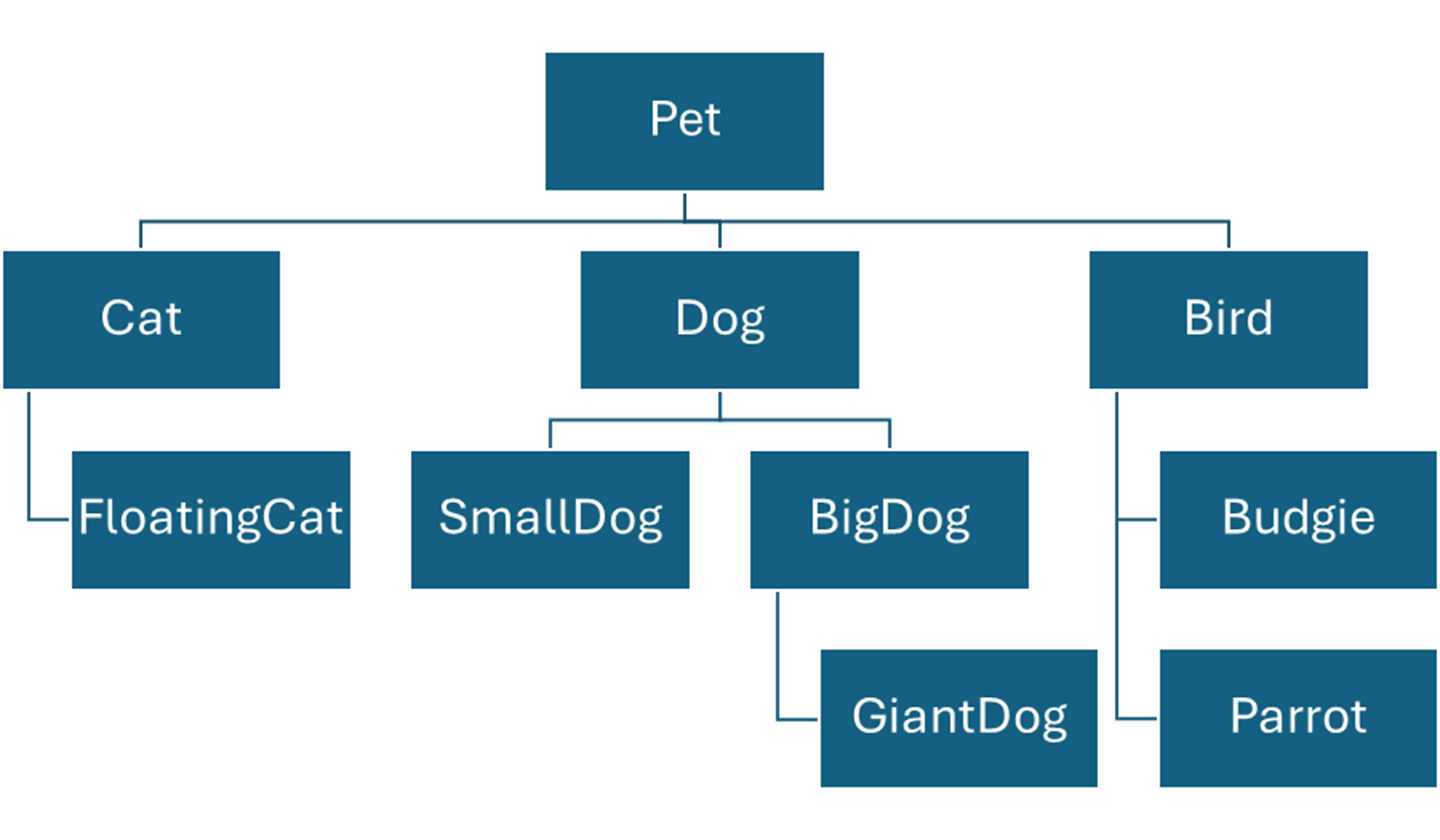
Having multiple levels of inheritance allows us to represent more kinds of relationship and have finer grained control of which classes share variables and methods. We often picture inheritance as a tree (in computer science, trees have branches going downward). We might eventually revise our design to reflect that all dogs have things in common, but there are also differences between big dogs and small dogs. We might also decide that giant dogs are like big dogs, except that they can be ridden by babies. We might also decide that we want to have a Parrot as a valid type for pets, and notice that they have enough in common with our existing Budgie class that we add a new class Bird as a superclass of both, and have that inherit from Pet (indicating that in this context, all the birds that matter to our program are pets).
Overriding
In our earlier example, we wrote the methods eat(), sleep(), and makeNoise() in Pet and then the other classes inherited them. This meant that when we tell a Dog, Cat, or Budgie to eat or sleep or make noise, they all do it exactly the same way. Sometimes, we need a particular subclass to change an inherited behavior. In that case we will re-write the body of that inherited method in the subclass, replacing the version from the superclass. This is called overriding.
Let’s have Dog override the makeNoise method; going “eeeep” is close enough to the noise our Cats and Budgies make, but we want Dogs to say “ruff”.
// Dog inherits everything from Pet
// and adds an instance variable
// and overrides makeNoise()
class Dog inherits Pet{
string breed
Cat * buddy
void makeNoise()
print(name + “ says ruff!”)
}
}
Now, when Cats or Birds are told to eat, they use the inherited version from Pet, but when Dogs are told to eat, they use the Dog-specific version.
If we have subclasses of Dog like SmallDog and BigDog and GiantDog, they will all inherit the overriding version from Dog and say “ruff” although any of them could also override, so we could decide that small dog’s say “yip” instead and add another override of makeNoise in the SmallDog class.
In addition to inheriting eat() from Pet, Cat had a special eat(Budgie*) method just for eating Budgies; remember that having two methods with the same name but different parameters is called overloading – this is different from overriding – Cats have two eat methods, the inherited one from Pet, and the overloaded version
void main(){
// p has all the things in the Pet class
Pet p
p.name = “generic pet”
p.eat()
p.makeNoise() // “generic pet says eeeep”
Budgie b
b.name = “Tweety”
b.makeNoise() // “Tweety says eeeep”
// c has all the things in the Pet class and the Cat class
Cat c
c.name = “Kitty McFreckles”
c.makeNoise() // “Kitty McFreckles says eeeep”
// d has all the things in the Pet class and the Dog class
Dog d
d.name = “Spot the Dog”
d.makeNoise() // “Spot the Dog says ruff!”
}
Being able to override allows us to have a set of shared behavior methods among many classes, but still give each one the flexibility to adjust how they do any of them. It also sets us up for the biggest concept in object oriented coding: Polymorphism.
Polymorphism
Depending on the actual program, we could have ended up with a lot more in our inheritance tree for pets: we could add branches to the inheritance tree for reptile pets, and rodent pets, and insect pets, and fish pets. When we then go to write our main code, we will probably have some parts where we are only using the methods they all have in common (the inherited methods). In that case, it is a bit annoying that we would have to re-write the code multiple times for different classes, when the only difference is the type.
In fact, in languages that support object orientation, we can write the code just once, for type Pet, and it will work for all the subclasses. Polymorphism means that a pointer variable of a superclass type can actually hold the address of any subclass type. It can only use variables and methods that are legal for the variable type, not those that the subclass may have added. However, when the program runs, any methods called will always be the correct version if the subclass overrides them.
void main(){
// Pet variable but pointing at a Dog
Pet * p = new Dog
p.name = “Fluffy”
p.sleep() // original sleep method
// since p is actually a Dog, call override method
p.makeNoise() // “Fluffy says ruff!”
// error, pets don’t have a breed
p.breed =
“nope”
// if we want to do dog-specific code,
// we need a Dog variable
Dog * d = new Dog
d.breed = “Beagle”
}
Polymorphism isn’t used when we want to write code that is specific to a subclass, but it does give us a way to write code that will work for any subclass, with different behaviors based on overriding
void main(){
Pet * p
print “Let’s try a starter pet!”
String user = prompt("dog, cat, or budgie?")
if (user == "dog") then
p = new Dog
else if (user == "cat") then
p = new Cat
else
p = new Budgie
end if
// this code works no matter which type they chose
p.name = prompt "what name?"
p.age = prompt "how old"
p.eat()
p.sleep()
p.makeNoise() // method called depends on user choice
}
Now that we have polymorphism, we can make Dog a little more flexible about being friends, instead of buddy being limited to Cats, we could make it a Pet
class Dog inherits Pet{
string breed
Pet * buddy
void makeNoise()
print(name + “ says ruff!”)
end makeNoise
}
void main(){
Dog fluffy
fluffy.name = “Fluffywuffykins”
print(“Choose a friend for ” + fluffy.name)
String user = prompt("dog, cat, or budgie?")
if (user == "dog") {
fluffy.buddy = new Dog
}else if (user == "cat") {
fluffy.buddy = new Cat
}else {
fluffy.buddy = new Budgie
}
// this code works no matter which type they chose
fluffy.buddy.name = prompt("what name?")
print(“Now they will talk”)
fluffy.makeNoise(); // dog version
fluffy.buddy.makeNoise() // method depends on user choice
}
Also note that an array of pointers to a superclass type can hold any subclass types
void main(){
Pet * petList[10]
// fill the array with various types of pet
for (int i = 0; i < petList.size; i = i + 1) {
if (i % 3 == 0) {
petList[i] = new Dog
}else if (i % 3 == 1) {
petList[i] = new Cat
}else {
petList[i] = new Budgie
}
// starter name
petList[i].name = “Pet #” + (i+1)
}
// this code works for all pets
for (int i = 0; i < petList.size; i = i + 1) {
petList[i].eat()
petList[i].sleep()
petList[i].makeNoise() // outcome depends on i
}
}
Note how simple the loop at the end of this is. There’s no if to check whether we should be doing a special different makeNoise method for Dogs, it just happens automatically. If we did more overriding in different classes, the outcome of that loop could be totally different for each type of pet, but this polymorphic code in main doesn’t have to change at all to reflect this. The part of the programming team writing the main code doesn’t even have to know whether any of the subclasses overrode a method from the superclass or not.
Encapsulation
In object oriented design, we divided our program into classes, which are separate but interacting, and each class holds both data and methods that act on that data. This is called encapsulation.
In addition to helping us design large scale programs by making the structure of the code reflect our conceptual understanding of the situation in the program, object orientation helps programmers be lazier in actually implementing and maintaining code.
Encapsulation divides the program into classes which can be implemented independent of each other. This allows different programming teams to work in parallel on different classes. It also means that we can pull classes out of one program and copy them into another program without having to re-write from scratch. And it means that when we later have to update or change the code in one class, those changes can be made without having to update all the code in the other classes.
But to get these benefits from object orientation, we have to follow rules for good object oriented design, and this means separating a class’ interface from its implementation.
Interface vs Implementation
When creating a class, we should clearly distinguish between the public interface of the class, which consists of the parts of the class that the rest of the program can interact with, and the private implementation which is the parts of the class that are not available to the rest of the program.
The public interface for a class should be part of the initial design and defines the parts of the class that other classes may need to use in their code – this is the way other classes can interact with this class. In general, the public interface of a class consists of a list of methods, some of which will return data values for the characteristics.
It is important that once a method is put into the public interface, it should not be changed – not the name, not the return type, not the parameters. Also we cannot remove methods from the interface. By putting something into the public interface, we are promising that it is a tool that other classes can freely use, so changing any of this would break another class’ code (which will probably enrage our programming peers!).
Any part of the class that is in the private implementation can be changed as needed to improve the code, fix errors, add new abilities, or meet the demands of management. This necessarily includes the bodies of all methods. It usually includes all instance variables, and it may include some methods that are not appropriate for use outside the class.
Hiding instance variables in the private implementation gives each class control of those variables’ values, so no class from the outside can set them to inappropriate values, helping instance variables avoid the problems we saw with global variables. It does also allow us to completely hide the value and even existence of an instance variable that needs to be hidden from the rest of the program for privacy or security reasons.
Object oriented languages may provide keywords such as public and private to explicitly say which parts of the class are in the public interface vs the private implementation.
class Account{
public string name // public (just for this example)
private double balance // private (correct)
// a public method that controls access
// to a private variable
public void deposit(double d){
// don’t allow negative values
if (d > 0) {
balance = balance + d
}
}
}
void main(){
Account * act = new Account
// name is currently public, so can be changed from outside
// that’s probably a bad idea
act.name = "Johann Dowe"
act.name = “stupid customer I hate him”
act.name = “”
// error, cannot access private
// from outside class
act.balance
= -1
// legal, use the public method
act.deposit(10)
}
We can always go into methods and change their bodies to change how they work, which means we can fix problems, make code more efficient, or improve readability without messing up other classes that call those methods. Method bodies are automatically part of the private implementation just because of how methods work.
Accessors and Mutators
Since instance variables are almost always private, it is standard to provide tools that allow outside classes to interact with them in a controlled way. In general, for each instance variable, we would provide a method to access the value of the variable, and a method to try to change the value of the variable.
The method to get access to the value is called an accessor or getter because the method is usually given a name that puts “get” in front of the name of the variable. Accessors are almost always very simple: just return the value of the variable.
The method to change the value is called a mutator or setter because the method is usually given a name that puts “set” in front of the name of the variable. Mutators need a parameter of the right type for the variable. At simplest they would simply put that value into the variable, but they might include an if for validation, so invalid values are never allowed to reach the instance variable.
class Job{
// monthly salary for this job
private double salary
// accessor
public double getSalary(){
return salary
}
// mutator
public void setSalary(double newval){
if (newVal >= 0) {
salary = newval
}
}
}
void main(){
Job myJob
myJob.setSalary(2700)
print “you got a 1% raise”
// new salary is 101% of the old salary
myJob.setSalary(myJob.getSalary() * 1.01)
// no effect if we try to set it to a bad value
myJob.setSalary(-300)
print(“Your salary is: $” + myJob.getSalary())
}
At first, adding accessors and mutators for every instance variable may feel like a lot of work, but actually it is an example of being lazy in a programmer way: we write these very simple methods in a standard way when we create the program, and this helps insure us against having to do complex difficult updating of the class for those variables later on.
Suppose the Job class in the example above was part of a larger program that you had to maintain. After the program had been in use for a year or so, management tells you that the program now needs to do everything in terms of yearly salary (maybe because there was ambiguity about which type of salary, maybe for legal reasons, maybe just because of management whim).
So we add a new yearlySalary variable with its own accessor and mutator, but we know we can’t remove the old accessor and mutator for the old salary variable – putting them into the public interface means we promise they will always be available.
But if everywhere in the program that had to access the salary went through that accessor and mutator, then if we just rewrite the bodies of the old accessor and mutator for the old salary variable to use the new yearlySalary variable, we shouldn’t have to make changes to any other code to meet the management’s requirements.
class Job {
private double salary
private double yearlySalary
public double getSalary() {
return getYearlySalary()/12
}
public void setSalary(double newval) {
if (newVal >= 0) {
setYearlySalary(newval * 12)
}
}
public double getYearlySalary() {
return yearlySalary
}
public void setYearlySalary(double newval) {
if (newVal >= 0) {
yearlySalary = newval
}
}
}
Notice that in the code above, the old salary accessor and mutator are using the new yearlySalary accessor and mutator. We’re future-proofing again. If next year we have to swap yearlySalary for something else, we will only have to update the yearlySalary accessor and mutator.
Interfaces
In some languages, the interface is an explicit structure, which is another means of achieving polymorphism. We can write our main program as polymorphic code, using only the parts of a type that are in the public interface, but the actual implementation might change.
In C++ each class is divided into a header, which lists the declarations of the public methods in the interface, and a separate class file that holds the implementations of these methods. This means that we could swap implementation files and the behavior of the class might change but the rest of the program sees the same interface.
In Java, an interface is a valid type for variables, and multiple classes could implement that interface, filling in the required methods, but in different ways.
This use of interfaces with polymorphism can lead to code that swaps out different implementations even during the run of a program, so we can replace one suite of methods implementing behaviors in one way with another suite that handles the same tasks in a different way, changing the way the program does these tasks as needed, without having to write out the different options explicitly in the main code, which might be written separately from any of those implementations, more of which could be added later as needed.